Zapier + SwitchBot Projector Scheduling Automation
An IoT scheduling integration turning booking and calendar events into SwitchBot projector actions through Zapier.
Project overview.
Turning Appointment Bookings Into Automated Projector Control
Imagine managing a bookable meeting room, presentation space or facility where customers regularly use a projector.
Before every appointment, someone must ensure the equipment is powered on and ready.
After the appointment ends, someone must turn it off.
But what happens when two appointments are scheduled back-to-back?
Should the projector turn off between them, only to be powered on again a few moments later?
And what if the projector does not respond to a standard power-off command because its remote control requires a special action?
These questions were at the center of a smart-device automation project completed by Superb Digitals.
The client, James S., used Skedda to manage appointments and wanted to connect booking activity to projector power control.
The objective was to reduce the need for manual intervention by automatically switching the projector on before a booking and off after the scheduled session.
The system also needed to recognize consecutive appointments and avoid unnecessary power cycling.
Superb Digitals developed an initial automation connecting Skedda, Zapier and SwitchBot in December 2024.
The client tested the scheduling automation and confirmed that it was working.
Nine months later, the client returned for further optimization.
The second engagement addressed consecutive-booking detection, Google Calendar integration and the projector’s custom infrared power-off behaviour.
The project illustrates the challenges of connecting software-based scheduling systems to physical equipment through APIs, webhooks and conditional workflows.
It also demonstrates why device automation needs real-world testing: a successful API request does not always mean the physical equipment performed the expected action.
Client: James S.
Industry: Business Consulting and Bookable-Space Operations
Project period: December 2024 – October 2025
Project type: Smart Device Control and Scheduling Automation
Booking platform: Skedda
Automation platform: Zapier
Device integration: SwitchBot API
Additional scheduling platform: Google Calendar
Primary automation: Scheduled projector power-on and power-off
Advanced requirements: Consecutive appointment detection, conditional shutdown, custom infrared commands and time-zone handling
What needed to change.
Preparing Equipment Automatically for Booked Appointments
The client wanted projector operation to reflect an appointment calendar.
When a customer booked a session through Skedda, the projector should prepare for that session automatically.
This was intended to eliminate the need to manually switch on the equipment before every booking.
The client also wanted the projector to turn off after use.
However, ordinary time-based automation was not sufficient.
A fixed schedule could switch the device off while the room was still booked.
It could also cause unnecessary power cycles when appointments were consecutive.
The automation needed to interpret booking information and take the appropriate action.
The initial business requirements were:
- Detect bookings created through Skedda.
- Turn the projector on before the scheduled start time.
- Turn it off after the appointment ends.
- Respect the relevant local time zone.
- Avoid switching off during consecutive bookings.
- Communicate with the projector through SwitchBot’s supported device-control interface.
These requirements turned a seemingly simple automation into a multi-system integration project.
Why Smart Device Automation Requires More Than a Timer
A timer can turn a device on or off at a specified hour.
But an appointment-based automation needs to respond to schedules that change.
One session may begin in the morning.
Another may begin in the afternoon.
A booking could last 30 minutes or several hours.
Two customers might reserve consecutive time slots.
The relevant power-control decisions depend on booking information rather than a single recurring schedule.
This is where event-driven automation becomes useful.
A booking system can provide information about appointments.
An automation platform can interpret that information and schedule actions.
A device API can then issue commands to the connected hardware.
However, these systems must agree about timing, identifiers and expected behaviour.
The project required coordinating those elements.
A connected solution.
Connect the Booking System to the Physical Device
The initial integration architecture involved three primary platforms.
Skedda managed the appointments.
Zapier handled the workflow and scheduling logic.
SwitchBot provided the API connection used to send equipment-control commands.
The intended sequence was:
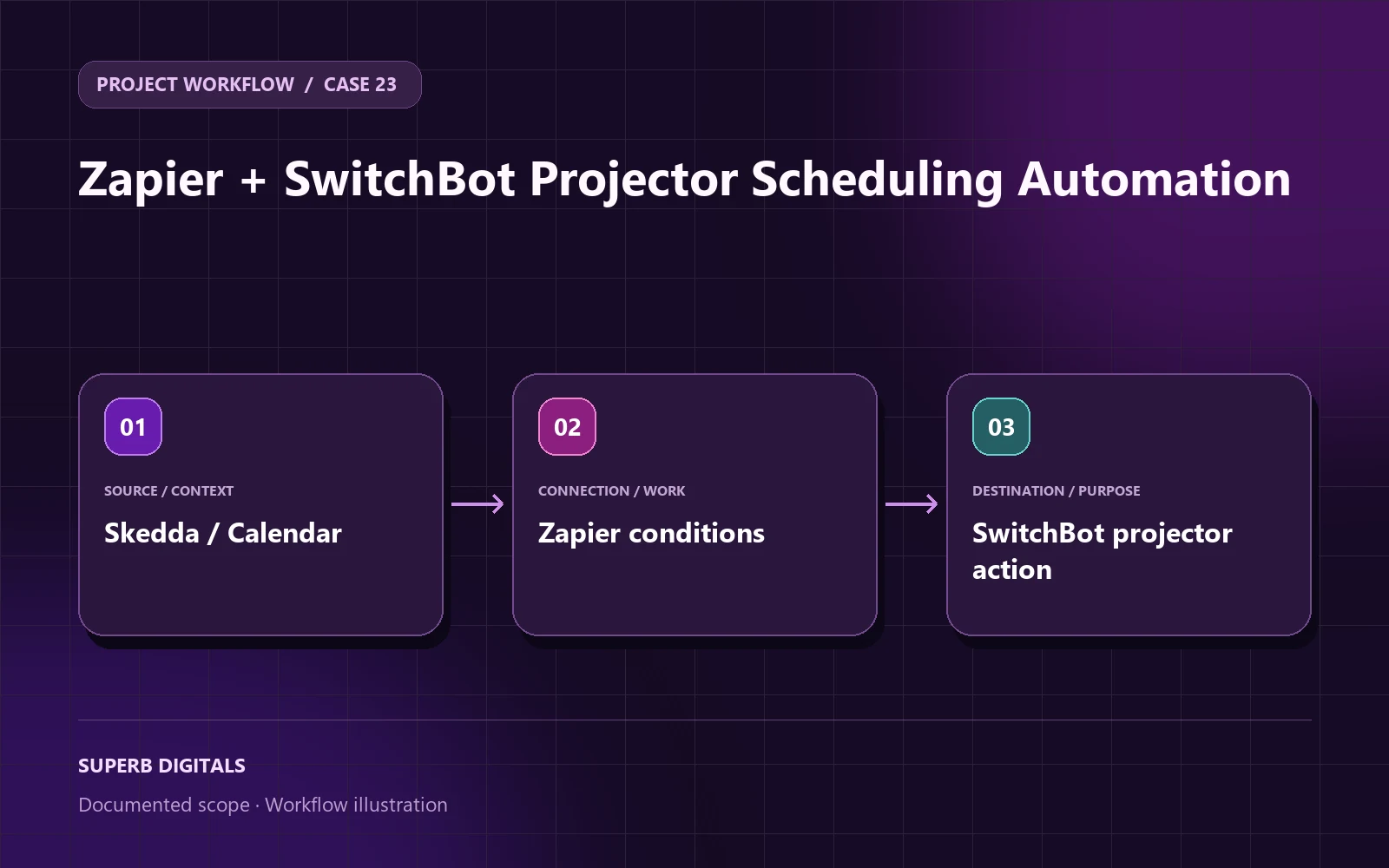
Skedda Booking → Zapier Workflow → Scheduled Delay → SwitchBot API Command → Projector Action
The client’s requirements also called for conditional logic around consecutive bookings.
The system needed to consider whether another booking began immediately after the current session.
If so, the projector should remain powered on rather than performing an unnecessary shutdown.
The implementation evolved as testing revealed specific behaviour that required adjustment.
Implementation, step by step.
Phase 1: Reviewing the Skedda Booking Requirements
The initial discussion began in December 2024.
The client explained that Skedda was the booking system and that Zapier would serve as the automation platform.
Before developing the workflow, we clarified the timing requirements.
Important questions included:
- How early should the projector turn on?
- How long after an appointment should it remain on?
- Which booking calendar or resources should the workflow monitor?
- Which SwitchBot-controlled device should receive commands?
- What should happen when appointments are consecutive?
- Which time zone should govern scheduling?
These details were necessary because the automation would control physical equipment.
An incorrect timestamp could cause a projector to switch on too late or turn off during a booking.
Establishing the Initial Timing Rules
During implementation, the workflow was described as turning the projector on five minutes before the appointment and completing the shutdown sequence two minutes after its scheduled end.
These were the configured values discussed in the December 2024 testing conversation.
They were project-specific requirements and should not be considered universal settings for all projectors.
Phase 2: Connecting Skedda With Zapier
The client wanted Zapier to respond to booking activity from Skedda.
The automation therefore needed access to appointment information.
Relevant booking details included the scheduled start and end times.
These values were necessary for calculating when the power-control actions should occur.
Why Booking Data Was Essential
A projector should not turn on immediately simply because someone creates an appointment several days in advance.
The automation needs to distinguish between the time the booking is created and the time the booking actually begins.
For example, a reservation created on Monday for a Friday appointment should not automatically switch on equipment on Monday.
The workflow needed to use the appointment’s scheduled time.
Scheduling the Power-On Action
Zapier was used to hold the appropriate action until the configured time.
This enabled the projector command to be associated with the booking schedule rather than the moment the booking was created.
Scheduling the Power-Off Action
The corresponding shutdown logic used the appointment end time.
It also needed to account for any additional delay requested by the client.
This introduced the need for consistent time interpretation across the connected platforms.
Phase 3: Configuring the SwitchBot API
SwitchBot provided the device-control connection.
The client’s projector was associated with SwitchBot-controlled equipment.
To send a command through the API, the integration needed to identify the correct device and provide valid authentication.
The initial implementation required information from the client’s SwitchBot environment.
The Difference Between MAC Addresses and API Device IDs
During development, the client supplied device information that included Wi-Fi and Bluetooth MAC addresses.
However, those identifiers were not the same as the device identifier required by the relevant SwitchBot API request.
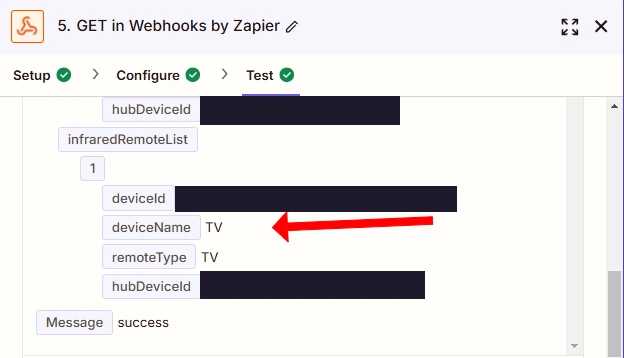
We identified this distinction and worked on retrieving the appropriate device ID through the API.
This was an important troubleshooting step.
A command directed at an incorrect identifier may fail even if the authentication and command structure are otherwise correct.
Sending Equipment-Control Commands
The API integration was intended to send the appropriate power-control command to the identified device.
For a standard supported action, the command could represent turning the equipment on or off.
The actual behaviour depended on the SwitchBot device configuration and the projector’s supported control method.
This distinction became especially important during the later project.
What We Delivered.
Results and Outcomes
Confirmed Outcomes
Initial scheduling automation delivered
The December 2024 engagement connected Skedda, Zapier and SwitchBot for scheduled projector control.
Time-based execution configured
The original workflow used appointment-based delays, including five-minute pre-start and two-minute post-end timing.
SwitchBot API device identification
The development addressed the difference between hardware MAC addresses and the required API device identifier.
Time-zone adjustment completed
The original workflow was revised to account for the client’s requested time zone.
Successful initial client testing
The client confirmed that the first automation was working and approved order completion.
Returning client
The same customer commissioned additional optimization work in September 2025.
Google Calendar integration introduced
The second engagement added a calendar-based approach to detecting consecutive bookings.
Conditional shutdown logic configured
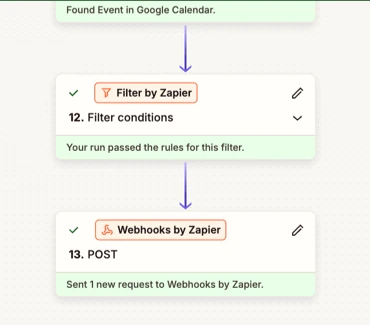
The work included a filter intended to suppress the off action when another relevant booking was scheduled.
Custom command issue identified and resolved by the client
The client corrected the SwitchBot custom infrared command parameters and reported that the power-off action was working.
Calendar-filter correction reported
After the client’s observation, Superb Digitals reported correcting the upcoming-event search condition.
Follow-on scheduling refinements
Outcomes Not Independently Verified
The available records do not establish:
- The number of appointments processed automatically
- A measured reduction in staff time
- A quantified reduction in projector power cycling
- A verified increase in projector lifespan
- Guaranteed operation through all schedule changes
- Complete testing of every overlapping or back-to-back booking combination
- Long-term hardware uptime
- Automatic recovery from every connectivity failure
- Perfect synchronization between Skedda and Google Calendar
- A comprehensive final production test after the October 11 correction
These outcomes would require device logs, automation history, booking data or additional client confirmation.
Client Feedback
The client praised the quick turnaround and the resolution of the Zapier problem.
The client also expressed interest in future collaboration.
The second engagement received positive written feedback following order completion.
However, the client continued reporting a technical issue after the order was accepted.
That issue was subsequently traced to the custom device command configuration, which the client corrected.
The two engagements therefore demonstrate both positive client satisfaction and a collaborative troubleshooting process.
Experience: Connecting Real Booking Systems to Physical Equipment
This project demonstrates first-hand experience working on an automation that affected an actual device.
Unlike a spreadsheet or email workflow, the automation needed to cause a physical result.
The projector had to turn on or off at the appropriate time.
That introduced dependencies on hardware configuration, infrared command behaviour and the availability of the connected services.
The project required real-world testing and adjustments.
This is practical experience with IoT-related business automation.
Expertise: Zapier, API Requests and Conditional Scheduling
The project involved several technical disciplines.
REST API Integration
Connecting Zapier to the supported SwitchBot control API.
Webhook and Event Processing
Using scheduling events to initiate automation actions.
Device Identification
Obtaining the correct API device identifier rather than relying on unrelated hardware addresses.
Time-Based Workflow Execution
Scheduling actions relative to appointment start and end times.
Time-Zone Handling
Adjusting the automation to reflect the client’s local scheduling requirements.
Conditional Logic
Suppressing the power-off action when a consecutive appointment existed.
Calendar Data Integration
Using Google Calendar events to support booking checks.
Custom Infrared Commands
Understanding the distinction between default device commands and user-defined button actions.
Automation Troubleshooting
Investigating why a Zap could complete its execution while the physical equipment did not respond as expected.
These skills apply to many connected-device and facility-management use cases.
Authoritativeness: Documented Repeat Business
The client later returned for additional work on the same automation.
That provides evidence of an ongoing professional relationship.
The second engagement also involved real technical configuration and troubleshooting.
Together, the projects establish practical commercial experience with connected scheduling and device-control workflows.
Trustworthiness: Honest Attribution and Transparent Testing
The project records show that different participants contributed to the final refinements.
Superb Digitals developed the original automation and worked on the later scheduling logic.
The client identified and corrected the crucial custom SwitchBot command parameter.
The client also noticed a problem with the calendar event search.
Superb Digitals acknowledged and corrected that filtering issue.
The records do not establish a complete final production test after all changes.
This case study preserves those facts.
Credible technical documentation should distinguish implementation, testing, client observations and final verification.
Why This Project Matters for Smart Workspaces
As businesses introduce more connected equipment, it becomes possible to automate processes that previously required manual attention.
Meeting rooms may contain projectors, displays, smart lighting or environmental controls.
Shared facilities may use booking systems to manage when spaces are occupied.
The challenge is making these systems work together.
A scheduling platform knows when an appointment occurs.
An automation platform can interpret the timing.
A device API can perform an appropriate action.
The value comes from connecting those capabilities safely and reliably.
The SwitchBot projector project illustrates that approach.
It also demonstrates why production-ready device automation requires attention to timing, device-specific commands and the consequences of incorrect actions.
Potential Applications Beyond Projectors
Similar automation principles can support other business operations.
A training center could use booking information to prepare presentation equipment.
A meeting-room operator might coordinate supported displays or lighting.
An event venue could automate noncritical equipment settings around reservations.
A shared facility could connect room bookings to notifications or equipment preparation.
However, each deployment requires checking device compatibility, operational risks, permissions and the availability of manual controls.
The original project does not establish implementation of these additional use cases; they are examples of where comparable integration principles may apply.
Lessons From the Project
1. An API Response Is Not the Same as Physical Confirmation
The automation may successfully send a request even when the projector does not perform the intended action.
Physical testing remains essential.
2. Scheduling Logic Must Consider Adjacent Bookings
A session ending does not always mean that equipment is no longer needed.
The next booking may begin immediately.
3. Time-Zone Configuration Is Critical
Incorrect time interpretation can make otherwise valid automation logic execute at the wrong moment.
4. Custom Device Buttons Need Appropriate API Parameters
Standard on/off commands may not work for every device configuration.
The exact command and command type must be supported by the device API.
5. Calendar Filters Need Correct Search Boundaries
A workflow must search the relevant time window or it may miss an upcoming event.
6. A Live Environment Requires Careful Testing
Device-control experiments should not interfere with active customer appointments.
7. Platform Plans Affect Deployment
An automation may require features that are not included in the current account plan.
8. Client Feedback Is Part of Technical Development
The client’s observations helped identify both the custom-command issue and the calendar-search problem.
Successful troubleshooting often requires collaboration between the technical specialist and the person operating the equipment.
Project visuals.
 View image
Frequently Asked Questions.
Can Zapier control a projector automatically?
Yes, where the projector is connected to a supported control system that exposes a compatible API or automation action. The exact setup depends on the equipment and its control interface.
Can SwitchBot integrate with Zapier?
SwitchBot can be integrated into Zapier workflows through supported connections and API requests, subject to the relevant account and device capabilities.
Can Skedda bookings trigger automation workflows?
Skedda supports integration options for booking-related events. The available methods and plan requirements should be verified against the current platform documentation.
Can a projector turn on before a meeting starts?
Yes. A scheduling workflow can calculate an action time relative to an appointment and send a supported power command before the booking begins.
Can a projector automatically turn off after a booking?
Yes, provided the device supports the required command and the automation correctly handles the appointment end time.
What happens when two appointments are back-to-back?
A suitably designed workflow can check for a consecutive booking and avoid sending an unnecessary power-off command.
Why would a SwitchBot projector turn on but not turn off?
Possible causes include an unsupported default command, incorrect custom-button parameters, device connectivity problems or an issue with the automation’s conditional logic.
What is commandType in the SwitchBot API?
It is a request parameter identifying the type of action being sent. Custom infrared buttons require the supported custom-command type.
Can SwitchBot use a custom infrared button?
Yes. Supported SwitchBot infrared remote configurations can expose customized buttons through the API when the correct request parameters are used.
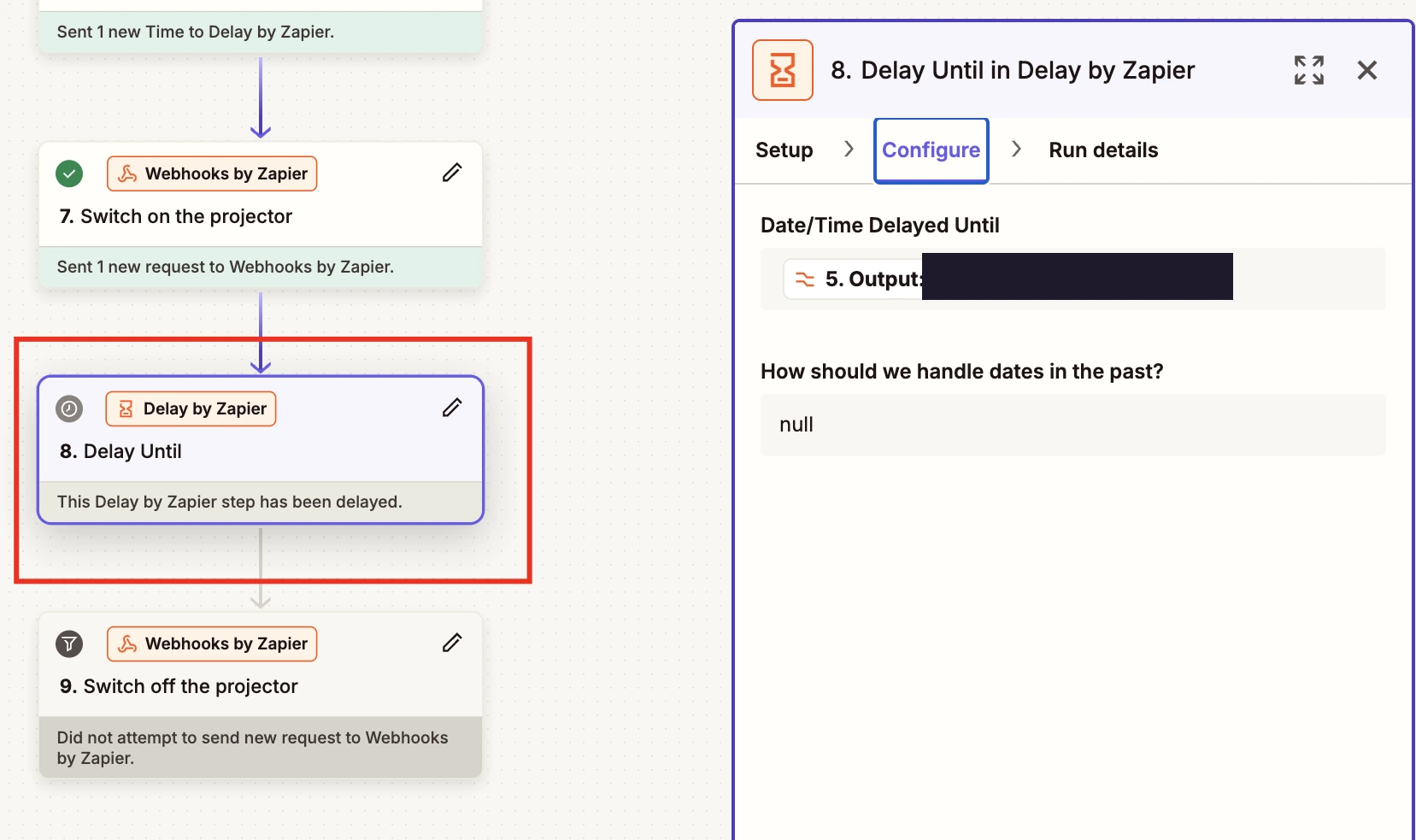
Why does Zapier show a step as waiting?
A scheduled or delayed step may remain pending until its configured execution time. This does not necessarily indicate failure.
Can Google Calendar help detect consecutive appointments?
Yes. A workflow can use relevant calendar information to check whether another appointment is scheduled, provided the calendar data is current and the query is configured correctly.
Can an automation account for different time zones?
Yes. The workflow should use the appropriate time-zone settings and correctly interpret booking timestamps.
Does an automated projector system guarantee zero downtime?
No. Device connectivity, API availability, scheduling accuracy and other factors can affect operation.
Can the same approach control other smart devices?
Potentially, yes. The device must support the necessary control commands, and the integration should be designed around the operational requirements.
Can Superb Digitals help build smart-device automation?
Yes. Superb Digitals works on Zapier integrations, API connections, scheduling workflows, conditional automation and connected business systems.
Need Your Booking System to Control More Than Just Appointments?
A booking platform can do more than record reservations.
When connected to the right systems, it can become part of a wider operational workflow.
At Superb Digitals, we help businesses integrate scheduling platforms, APIs, CRMs and automation tools.
Our services include:
- Zapier automation
- Make.com and n8n workflows
- SwitchBot API integration
- Scheduling and booking automation
- Smart workspace integration
- Webhook configuration
- Calendar synchronization
- Custom conditional workflows
- API troubleshooting
- Business process automation
Whether you need to connect a booking system to another application or automate a supported device, we can help assess the technical requirements and develop a practical integration.
Let’s discuss your custom automation project.
Visit https://superbdigitals.com/ to explore our services.
Superb Digitals — Web Development, CRM & AI Automation Solutions.
Need devices to respond to your booking schedule?
Tell us about your project and discuss the next steps with Superb Digitals.
Related client work.
 AI Automation
Hostfully & PriceLabs Integration
Two rental listings with different booking windows, connected pricing and practical stay-rule troubleshooting.
 AI Automation
24/7 Weather Monitoring & Smart Alert Automation
A six-phase weather automation project using Tempest, WeatherLink, IFTTT, Make.com and Apps Script for rain and storm alerts.
 AI Automation
Leonidas Labs — AI-Powered Quiz & Automated Report Generation
An AI-powered quiz funnel connecting Jotform, Make.com, OpenAI, Brevo, Stripe and Google Docs for personalized reports.