

WordPress to Facebook Publishing Automation
A WordPress-to-Facebook publishing repair using RSS and IFTTT, with separate Google Business Profile API limitations.
Project overview.
Restoring Automated News Publishing Between WordPress and Facebook
For a news publisher, publishing an article is only the beginning.
The article needs to reach the people who want to read it.
Some visitors discover news directly through a website. Others follow updates through search engines, newsletters or social media.
For many local and regional publications, Facebook remains one of the channels through which readers discover newly published stories.
However, maintaining that connection manually can become repetitive.
A website may publish several articles throughout the day. Reposting each article separately requires someone to copy the URL, select the featured image, prepare a caption and publish it to the relevant Facebook Page.
Automation can simplify that process.
When a new article is published on WordPress, an integration can detect it and create a corresponding Facebook link post.
But what happens when that integration stops working?
The news website continues publishing, yet its Facebook Page no longer receives the expected updates.
That was the challenge behind a WordPress and IFTTT automation engagement undertaken by Superb Digitals in September 2025.
The client operated a regional news publishing business.
Their website was built on WordPress, and they had previously used IFTTT to distribute published articles to their Facebook business page.
The integration had worked before, but changes made during earlier website maintenance appeared to have disrupted the publishing process.
The client needed help restoring the connection without creating unnecessary complications or introducing avoidable subscription costs.
Superb Digitals investigated the integration, explored an RSS-based publishing route and supported testing of the Facebook posting workflow.
During testing, the client observed newly published content appearing on the Facebook Page, although the delay between website publication and social distribution required explanation.
The client later returned for an additional Google Business Profile publishing project and further adjustments to the Facebook post format.
The Google Business Profile integration was not completed and the separate Google Business Profile expansion was not part of the demonstrated Facebook delivery.
This case study documents the verified publishing work, relevant troubleshooting, additional requirements and lessons from the engagement.
It demonstrates the importance of understanding both the technology and the business objective behind an automation.
Client: Regional News Publishing Business
Client identity: Withheld for confidentiality
Industry: Local News, Digital Publishing and Online Media
Project period: September–October 2025
Primary website platform: WordPress
Social publishing destination: Facebook Pages
Automation platform: IFTTT
Content source used: RSS Feed
Social sharing requirements: Article URLs, suitable previews and featured images
Related technical area: Open Graph metadata
Additional automation platform evaluated: Make.com
Requested expansion: WordPress to Google Business Profile
Documented results: Restored publishing activity observed during testing, order acceptance and positive client feedback
What needed to change.
WordPress Articles Were No Longer Reaching Facebook
The client’s website was still publishing news.
The problem was the connection between the website and its Facebook Page.
According to the client, the automation had previously worked.
However, after another person performed website-related changes, the IFTTT connection stopped behaving as expected.
The client relied on automated publishing because a virtual assistant was already scheduling the articles.
That meant the business had an established editorial process.
The missing component was the reliable transfer of published stories to social media.
The Existing Publishing Routine
The client explained that articles were scheduled for publication in the morning.
Once published, the stories were expected to appear on Facebook through IFTTT.
The process was intended to run without requiring the business owner to manually share each article.
The Consequence of a Broken Connection
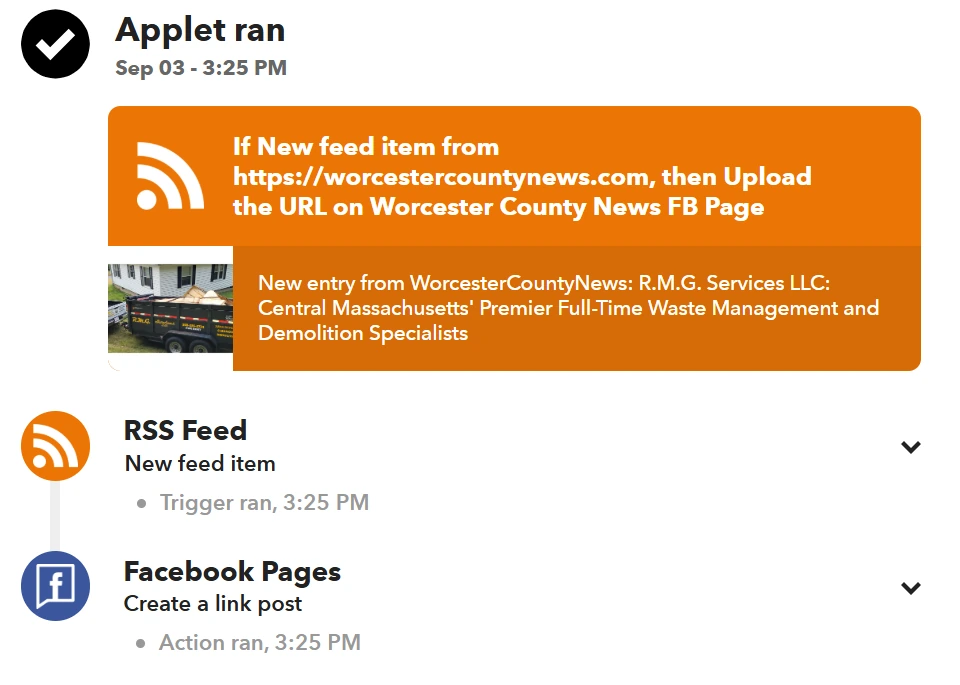
On September 3, the client checked the Facebook Page and reported that its latest visible post was several days old.
The website had continued operating.
However, the expected Facebook updates were not appearing according to the client’s schedule.
This created concern because the automated distribution process was an important part of the publisher’s daily operations.
The client wanted the integration restored without disrupting the existing content workflow.
Why a Working WordPress Website Does Not Guarantee Social Publishing
WordPress and Facebook perform different functions.
WordPress manages content publication.
Facebook displays content shared through the relevant social platform.
IFTTT acts as the connection between supported triggers and actions.
For the complete process to work, several conditions must be satisfied.
The source system must expose new content.
The automation must identify the new item.
The Facebook connection must remain authorized.
The selected action must use the appropriate content fields.
And the destination must accept the resulting post.
A website can operate normally while one of these integration steps fails.
This is why troubleshooting requires inspecting the whole publishing chain rather than assuming that the issue must originate inside WordPress.
Why Full-Article Republishing Was a Problem for the Client
The publisher’s objective was not simply to display text on Facebook.
The business wanted people to visit its website.
The social post was supposed to introduce the article and provide a link.
When the complete story appeared in the Facebook caption, the client believed readers would have less reason to click through.
The Role of a Preview
A suitable preview should describe the article accurately.
It should also be short enough to function as an introduction rather than a complete replacement.
The Role of the Article URL
The link connects the social post to the original publication.
It gives readers access to the full story and any supporting material available on the website.
The Role of the Featured Image
A suitable image can help communicate the story’s subject and make the link more recognizable.
Why Automation Configuration Matters
A feed may provide both a summary and full article content.
Using the wrong field in the social message can create a different result from the one the publisher intended.
This is a common content-mapping challenge.
Documented Outcomes From the Completed Facebook Project
An Existing Publishing Problem Was Investigated
The client had an established WordPress-to-Facebook process that was no longer operating reliably.
RSS Was Used as the Content Source
The developer reported selecting the website’s RSS feed for the IFTTT publishing workflow.
Facebook Posting Was Observed During Testing
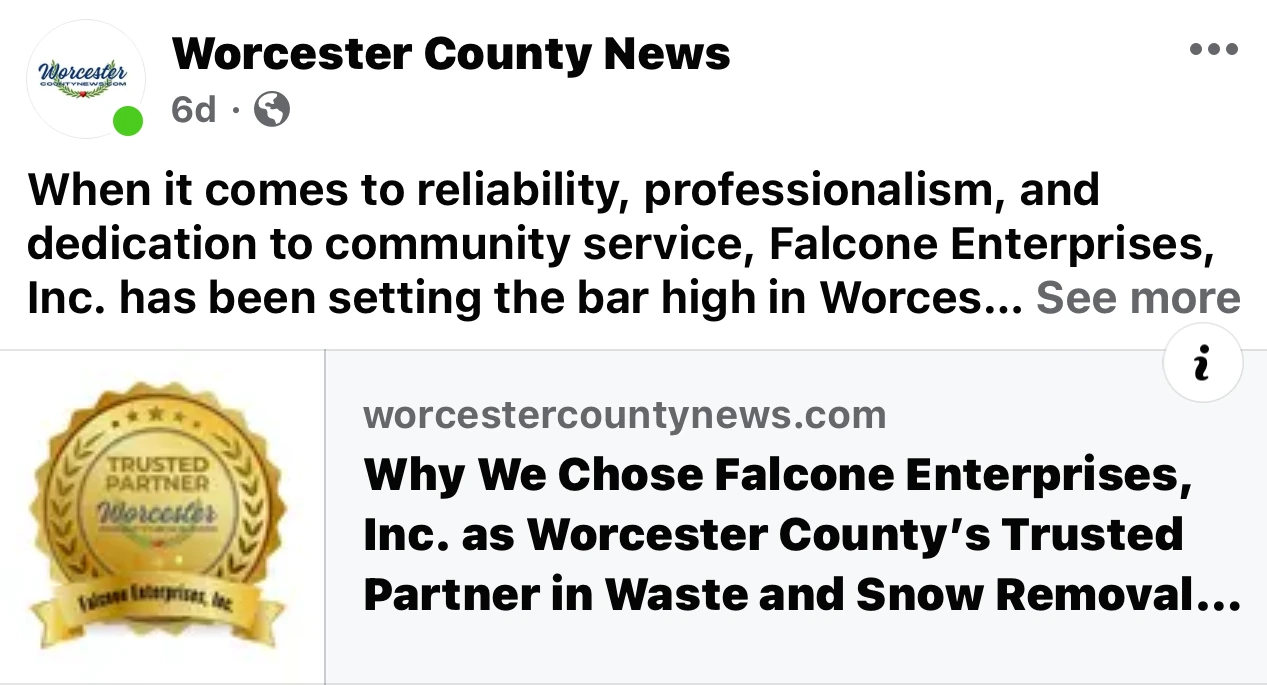
The client identified newly visible posts and asked whether the automation was working.
Publishing Delays Were Investigated
The project included identifying and explaining a delay associated with the feed-based process.
Client Acceptance
Client Feedback
The client praised the service and expressed interest in future collaboration.
Further Message-Formatting Work Was Reported
In October, the developer reported updating the configuration to avoid posting the full article body.
The final outcome of that particular adjustment was not independently verified.
Separate Google Business Profile Requirements
The second engagement included:
- A request for WordPress-to-Google Business Profile publishing
- Consideration of Make.com as the automation platform
- Discussion of article URLs, excerpts and featured images
- Account-access troubleshooting
- Google Cloud and API configuration discussions
- Multiple timeline extensions
- Client concern about incomplete delivery
- Separate marketplace administration, unrelated to the demonstrated publishing work
These activities demonstrate technical discovery and troubleshooting, but not a completed publishing integration.
A connected solution.
Phase 1: Understanding the Existing IFTTT Publishing Setup
The first task was understanding how the client had connected WordPress to Facebook.
The client explained that IFTTT had previously published articles from the news website to the Facebook business page.
The automation stopped working after earlier website changes.
This raised several possible areas for investigation.
The source connection might no longer be valid.
The trigger might not be detecting new content.
The Facebook destination might require reconnection.
Or the application might be using incorrect information from the source article.
Why Preserving the Existing Workflow Mattered
The client did not want to unnecessarily replace a system that had previously worked.
They were also concerned about introducing another paid automation service.
This influenced the approach.
Rather than immediately moving the entire publishing process to a different platform, the existing IFTTT setup remained an important option.
Implementation, step by step.
Phase 2: Evaluating WordPress and RSS as Content Sources
The project’s original scope focused on troubleshooting the IFTTT applet and ensuring that the correct featured image appeared on Facebook.
During development, we explored using the website’s RSS feed as the source of published articles.
On September 2, Superb Digitals reported using RSS instead of requiring a direct WordPress connection.
What Is an RSS Feed?
RSS is a format that allows websites to publish structured information about newly available content.
For a news website, that information may include article titles, URLs, publication dates, summaries and other supported fields.
An automation platform can monitor the feed and act when a new item becomes available.
Why RSS Was Relevant
The news website already had a content publication process.
Using its feed created another way for IFTTT to detect newly published articles.
This reduced the need to depend entirely on the original WordPress connection.
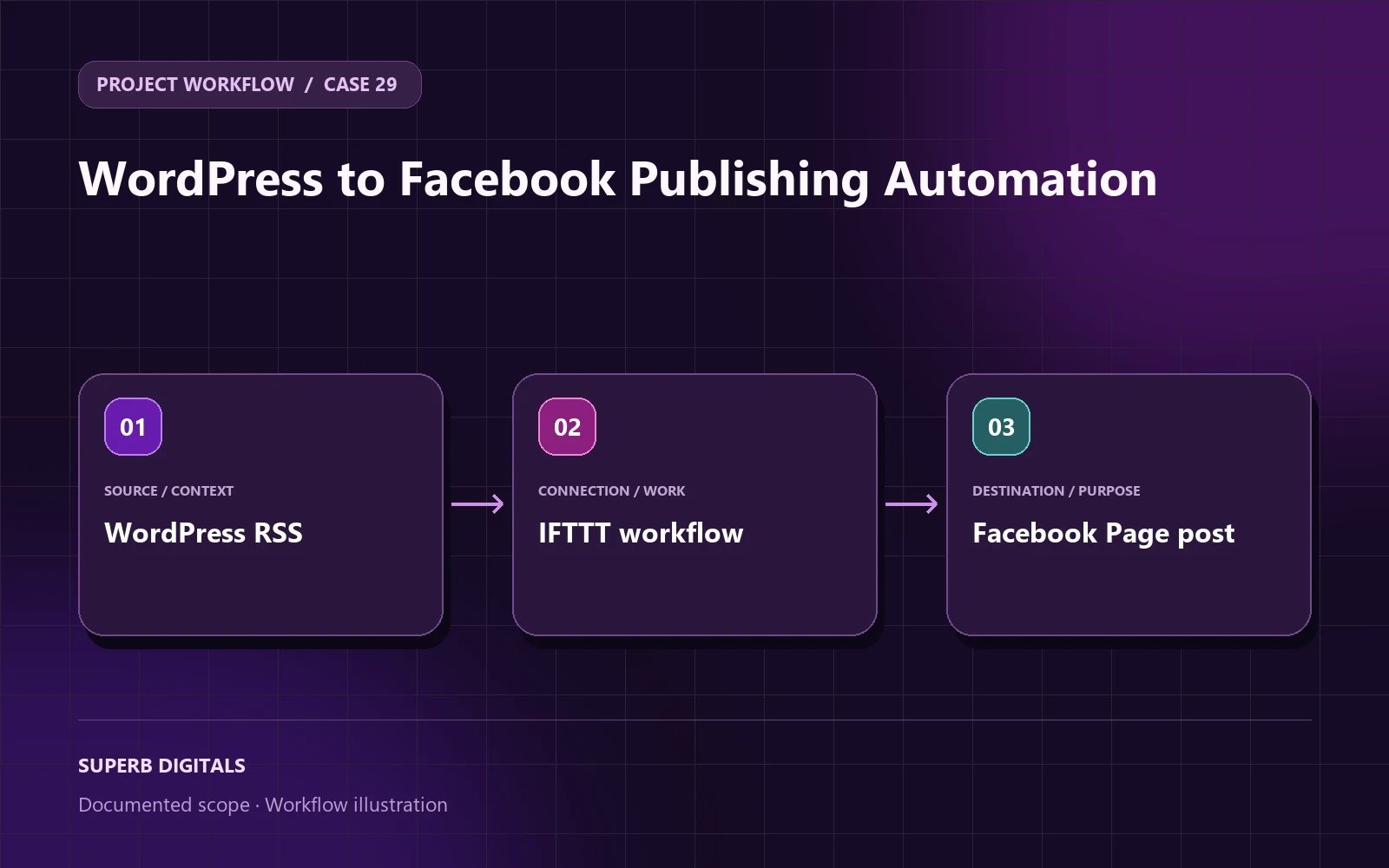
The Intended Architecture
The revised publishing process followed a straightforward pattern.
WordPress publishes an article.
The article becomes available through the site’s RSS feed.
IFTTT detects the eligible new feed item.
The automation creates a Facebook link post.
Readers can use the link to visit the original article.
This architecture was central to the development discussion.
Phase 3: Working With the Existing Publishing Schedule
The publisher already scheduled articles in WordPress.
This is different from manually publishing each article at the moment someone wants it shared.
The automation needed to work with the actual time a post became publicly available.
Scheduled Articles
An editor might prepare an article ahead of time.
WordPress then publishes it at the scheduled time.
The RSS-based workflow should detect the article after it becomes available in the feed.
The Importance of Source Publication
A scheduled draft should not necessarily be treated as a published article.
The automation needs an appropriate publication signal.
For this project, the RSS feed served as the selected mechanism for detecting new content.
Why End-to-End Testing Was Necessary
A successful WordPress publication does not automatically prove that the RSS feed updated.
And an updated RSS feed does not automatically prove that Facebook received the resulting link post.
Each stage needed to be considered separately.
Phase 4: Configuring the RSS-to-Facebook Publishing Approach
IFTTT was used to connect the feed with the Facebook Page.
The intended action was to create a link post when a qualifying feed item appeared.
The link post would direct readers to the original article.
Why Link Posts Were Appropriate
A news publisher generally wants readers to reach the full story on its website.
A link post provides a route from the Facebook Page to the original article.
This is different from copying the entire article body into the social media post.
Information Available to the Workflow
An RSS-based automation can potentially use information such as:
- Article title
- Article URL
- Publication timestamp
- Summary or excerpt
- Feed information
- A suitable image URL, where provided
The exact available fields depend on the feed and integration.
For the historical project, the evidence confirms the RSS-based approach.
It does not contain a complete export identifying every individual field configured in the final IFTTT applet.
What We Delivered.
Results Not Independently Verified
The available records do not establish:
- A measured increase in Facebook followers
- A specific number of articles successfully distributed
- An increase in website traffic
- An improvement in social engagement rates
- Guaranteed immediate social publishing
- A verified permanent correction to every featured-image issue
- Independently confirmed changes to specific Open Graph tags
- A fully successful Google Business Profile publishing workflow
- Approval of the relevant Google Business Profile API application
- A measured improvement in Google Search rankings
- Successful Google News enrollment
- A measurable return on investment
- Continuous error-free automation after the final October changes
These claims would require additional analytics, access logs or client-confirmed evidence.
Client Feedback
The client described the technical service in strongly positive terms and expressed interest in returning for additional work.
The customer did subsequently commission another automation.
However, that later engagement was not completed successfully.
The two outcomes should be represented separately.
Positive feedback from one project should not be used to imply a successful result for another.
Experience: Troubleshooting a Real News Publishing Workflow
The project involved a live news website and a publishing process already used by the business.
The automation was not built around fictional test data.
Real scheduled articles were part of the workflow.
The client checked whether the corresponding Facebook posts appeared.
The engagement also involved handling delays, explaining technical behaviour to a nontechnical client and responding to further formatting concerns.
These activities demonstrate first-hand experience with content distribution automation.
Expertise: RSS, IFTTT and WordPress Integration
The engagement involved several technical areas.
RSS Integration
Understanding how published WordPress content can be detected through a feed.
IFTTT Automation
Connecting supported content triggers to Facebook publishing actions.
WordPress Content Structures
Understanding how article titles, excerpts, URLs and featured images relate to downstream publishing.
Open Graph Metadata
Assessing the metadata used to support social link previews.
Social Content Mapping
Distinguishing between summaries, full article bodies and link destinations.
Workflow Troubleshooting
Investigating delayed or missing posts and checking the existing application connections.
API Access Assessment
Understanding the external approval dependencies involved in the proposed Google Business Profile expansion.
Business Communication
Explaining automation behaviour and coordinating tests with a client and their editorial team.
These capabilities are useful in digital publishing, content marketing and business automation projects.
Authoritativeness: Verified Buyer Satisfaction
The client also returned to request another integration.
This demonstrates that the original work generated sufficient confidence for the client to consider additional collaboration.
However, the evidence does not justify claims about increased search visibility, website traffic or broader commercial performance.
The original technical implementation and buyer feedback remain the most reliable authority signals.
Trustworthiness: Respecting Client Confidentiality and Reporting Limitations
During the engagement, the client expressed concern about publicly displaying their project work.
For that reason, this case study keeps the publisher’s identity private.
It also distinguishes between the original Facebook automation and the incomplete Google Business Profile expansion.
The original project received positive feedback and was formally accepted.
The separate Google Business Profile expansion should not be confused with the demonstrated Facebook publishing workflow.
The later Facebook formatting changes were reported but not independently verified through a final client test.
These facts matter.
A trustworthy portfolio should show genuine implementation work without presenting every engagement as a flawless success.
Engineering Lessons From the Project
1. A Published Article Does Not Guarantee a Social Post
WordPress, the RSS feed, IFTTT and Facebook each represent a separate stage in the publishing process.
2. RSS Can Provide an Alternative Content Trigger
A website feed may support publishing automation even when a direct application connection becomes difficult to maintain.
3. Polling Introduces Timing Considerations
A feed-based integration may not publish a social post at exactly the same moment as the original article.
4. Featured Images Require Proper Mapping
The image used by WordPress may need appropriate metadata or feed information to appear correctly in the social destination.
5. A Link Post Should Reflect the Publisher’s Objective
For this client, the Facebook post was intended to encourage readers to visit the original article.
6. Multiple Active Automations Can Cause Confusion
An old applet may continue running with different content fields or formatting.
7. Small Publishing Errors Can Affect Daily Operations
For a news business, reliable content distribution is part of the regular editorial workflow.
8. Client Access Determines What Can Be Tested
Website and platform permissions influence how quickly integration problems can be investigated.
9. External API Approval Is a Real Project Dependency
A planned Google Business Profile integration cannot be considered complete until the required access is available and the relevant actions have been tested.
10. Clear Scope and Acceptance Criteria Matter
A completed Facebook publishing workflow and a new Google Business Profile integration should be treated as separate milestones.
How We Would Strengthen This Automation Today
A modern WordPress-to-social publishing workflow should have clear source, formatting and error-handling rules.
Step 1: Confirm the Source
Identify whether the automation will use the WordPress API, a feed or another supported content trigger.
Step 2: Detect Eligible Published Posts
Only process articles that meet the business’s publication criteria.
Step 3: Retrieve the Required Fields
Obtain the article title, URL, summary and approved image information.
Step 4: Validate the Article URL
Confirm that the link points to the intended public article.
Step 5: Inspect the Social Preview
Check whether the page’s Open Graph metadata represents the article correctly.
Step 6: Generate a Suitable Caption
Use an approved summary or excerpt rather than copying the complete article.
Step 7: Prevent Duplicate Publishing
Maintain a reliable method of identifying articles already processed.
Step 8: Publish Through the Approved Integration
Use a supported Facebook Pages publishing action.
Step 9: Record the Result
Track the article identifier, destination and delivery status.
Step 10: Review Failures
Provide a way to investigate missing posts, authentication errors or invalid media.
This is a recommended architecture based on the experience of the project.
It should not be described as the complete historical implementation.
Similar Applications for Other Organizations
The same content-distribution principles can support different businesses.
A professional services company may want new blog articles shared automatically.
A local publisher may need updates distributed to several approved channels.
A nonprofit may use RSS-based publishing for announcements.
A travel business may want destination articles linked to social pages.
An educational organization could share new resources when they become publicly available.
Each implementation requires platform-specific permissions and content rules.
However, the underlying goal is consistent:
Connect published content to the communication channels used by the audience.
Project visuals.
 View image
Frequently Asked Questions.
Can WordPress automatically post new articles to Facebook?
Yes. WordPress content can be connected to supported publishing workflows using RSS feeds, APIs or third-party automation platforms.
Can IFTTT connect an RSS feed to Facebook Pages?
Yes. IFTTT provides supported RSS Feed triggers and Facebook Pages actions for creating link posts.
Why did my WordPress-to-Facebook automation stop working?
Possible reasons include disconnected accounts, changed source settings, invalid RSS feeds, trigger problems, permission changes or application configuration errors.
Can an RSS feed replace a direct WordPress trigger?
In some cases, yes. A supported RSS feed can provide new published content to an automation without requiring a direct WordPress trigger.
Why are my Facebook posts delayed?
Feed updates, polling intervals and downstream processing can affect the time between publishing an article and creating a social post.
Does IFTTT post articles to Facebook instantly?
Not necessarily. Some IFTTT triggers use polling and therefore depend on the applicable check interval.
Can WordPress featured images appear in Facebook link posts?
Yes. The result depends on the available image information, social metadata and how the destination processes the article URL.
What is Open Graph metadata?
Open Graph metadata describes information about a webpage for social sharing, including its title, description, URL and representative image.
What does og:image do?
The og:image property identifies an image associated with the webpage for supported social preview systems.
Why is Facebook showing the wrong article image?
The issue may involve missing or conflicting metadata, an unsuitable image, stale cached information or incorrect field mapping.
Can IFTTT use an article excerpt instead of the full content?
That depends on the selected trigger and available fields. The integration should use an appropriate summary field where the business wants a short preview.
Why should a news publisher avoid reposting an entire article on Facebook?
A publisher may prefer to give readers a concise introduction and direct them to the original website for the complete story.
Can WordPress articles also be posted to Google Business Profile?
Potentially, yes, using the supported Google Business Profile API and an appropriately authorized integration.
Is Google Business Profile API access automatic for every business?
No. API access has separate eligibility and authorization requirements. A verified business listing does not by itself establish that an application is approved for the required API operations.
Can Make.com connect WordPress to Google Business Profile?
An appropriate integration may be possible where the relevant accounts, APIs, permissions and application capabilities support the required actions.
Does automated social publishing automatically improve SEO?
No. Social distribution can support content discovery, but it does not guarantee higher organic search rankings.
Can automated social sharing increase website traffic?
It may help readers discover content, but the result depends on the audience, article quality, presentation and distribution performance.
How can duplicate Facebook posts be prevented?
A suitable workflow can track processed article identifiers and avoid repeatedly publishing the same item.
Is IFTTT or Make.com better for WordPress social publishing?
The appropriate platform depends on supported triggers, required formatting, budget, volume, maintenance and additional workflow logic.
Can Superb Digitals repair an existing WordPress social automation?
Yes. Superb Digitals works on WordPress integrations, IFTTT troubleshooting, RSS publishing, Make.com workflows and related automation systems.
Need Your Website Content Connected to Your Marketing Channels?
Publishing content should not require repeatedly copying the same information between applications.
With the right integration, your website and supported marketing tools can work together.
At Superb Digitals, we help businesses troubleshoot, design and maintain connected publishing processes.
Our services include:
- WordPress automation
- IFTTT workflow integration
- RSS feed automation
- Facebook Pages publishing workflows
- Open Graph and social preview troubleshooting
- Make.com and n8n automation
- Blog content distribution
- API and webhook integration
- Social media workflow troubleshooting
- Website SEO and technical optimization
- Automated content repurposing
- Custom publishing processes
Whether your existing integration has stopped working or you want to develop a new content-distribution workflow, we can help assess the requirements and build an appropriate solution.
Let’s discuss your website and social automation project.
Visit https://superbdigitals.com/ to explore our services.
Superb Digitals — Web Development, CRM & AI Automation Solutions.
Need WordPress posts to reach Facebook automatically?
Tell us about your project and discuss the next steps with Superb Digitals.
Related client work.
 AI Automation
Hostfully & PriceLabs Integration
Two rental listings with different booking windows, connected pricing and practical stay-rule troubleshooting.
 AI Automation
24/7 Weather Monitoring & Smart Alert Automation
A six-phase weather automation project using Tempest, WeatherLink, IFTTT, Make.com and Apps Script for rain and storm alerts.
 AI Automation
Leonidas Labs — AI-Powered Quiz & Automated Report Generation
An AI-powered quiz funnel connecting Jotform, Make.com, OpenAI, Brevo, Stripe and Google Docs for personalized reports.