
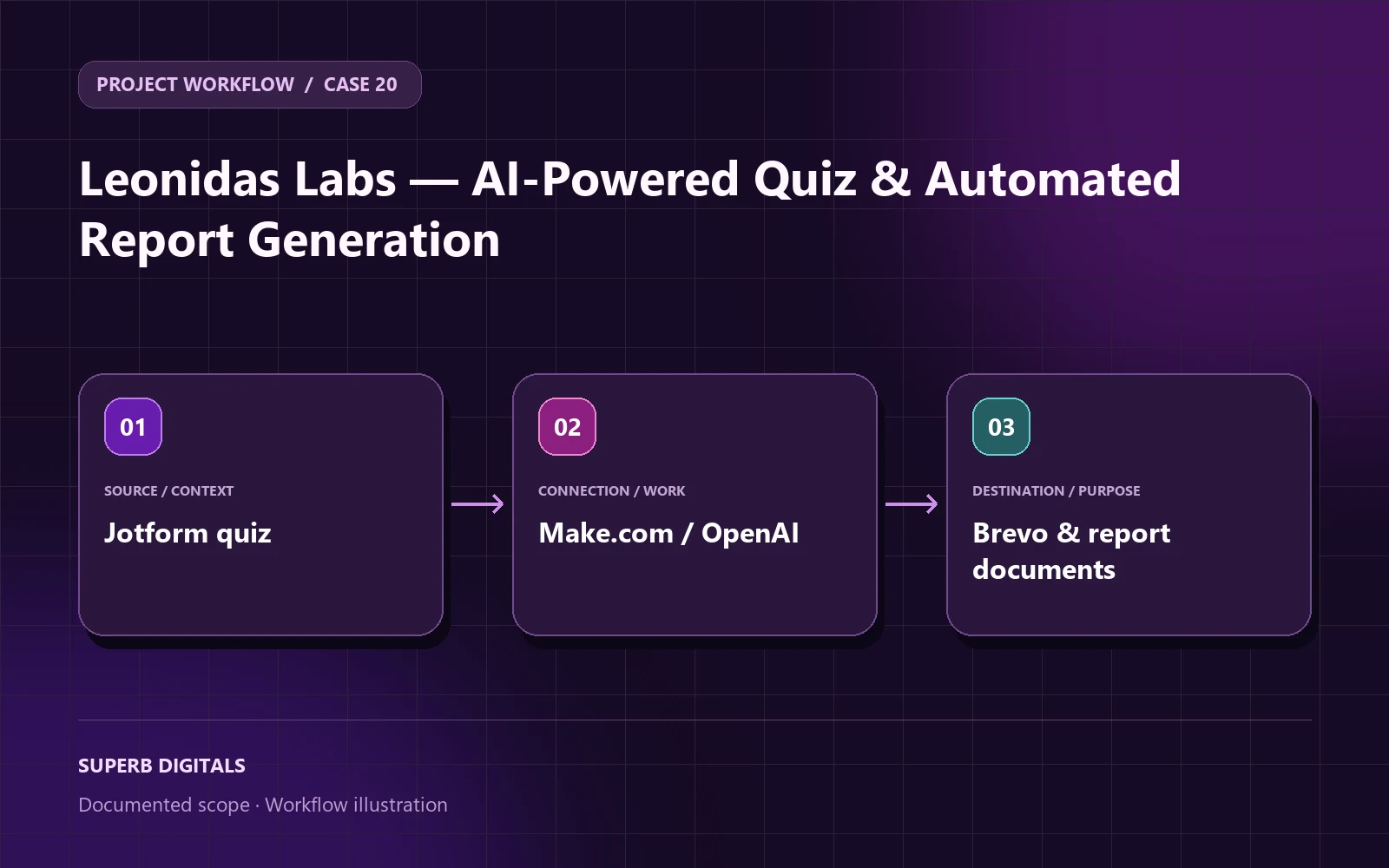
Leonidas Labs — AI-Powered Quiz & Automated Report Generation
An AI-powered quiz funnel connecting Jotform, Make.com, OpenAI, Brevo, Stripe and Google Docs for personalized reports.
Project overview.
Turning a Personal Development Quiz Into an AI-Powered Digital Product
What if someone could complete an online assessment and receive a personalized report automatically?
Not a generic confirmation email.
Not a fixed document containing the same advice for everyone.
But a report generated from the individual’s own answers, presented in a professional format and delivered through an automated customer journey.
That was the concept behind Leonidas Labs’ True Purpose Quiz.
The business wanted to help people explore their personal goals, motivations and sense of direction through an AI-assisted assessment experience.
However, the client needed more than an online form.
The proposed system had to collect answers, interpret the responses, generate a personalized preview, send an email, process payment and deliver a more detailed report.
It also needed to work without manually writing every assessment or sending every document.
Superb Digitals was engaged to develop the automation connecting these steps.
The implementation involved Jotform, Make.com, OpenAI’s API, Brevo, Stripe, Google Docs, Google Drive and document-processing tools.
As the project progressed, the workflow evolved through practical testing, revisions and improvements to the report presentation.
This case study documents the automation architecture, implementation process, technical problems and lessons from building an AI-powered digital assessment workflow.
Client: Leonidas Labs
Client representative: Keenan Assaraf
Product: True Purpose Quiz
Industry: Personal Development and Digital Products
Project period: May–July 2025
Core services: Workflow Automation, AI Integration, Form Processing, Personalized Content Generation, Email Automation, Payment Integration and Report Generation
Form platform: Jotform
Automation platform: Make.com
AI processing: OpenAI API
Email delivery: Brevo
Payment platform: Stripe
Document generation: Google Docs and Google Drive
Additional tools: Canva and PDF-processing utilities
Order status: Completed
Planned product price: $19.99 for the full report
What needed to change.
Making Personalized Reports Available Without Manual Processing
Leonidas Labs wanted visitors to answer a collection of questions about their personal development.
Their responses would become the basis of an individualized report.
The business intended to offer a brief preview first and a more detailed report after purchase.
This created a two-stage digital product journey.
The first stage needed to create interest and demonstrate value.
The second stage needed to provide the purchased report.
Although the concept appeared straightforward, implementing it involved several technical dependencies.
The form needed to supply useful answers.
The AI needed instructions for analyzing those answers.
The system needed to identify the correct recipient.
A suitable email had to be generated and formatted.
Payment needed to be connected to the individual submission.
The full document had to be created in a readable format.
And the final report needed to reach the correct person.
If any of these steps failed, the customer could encounter an incomplete experience.
That made reliability, data consistency and presentation quality central to the project.
The Five Main Implementation Challenges
Challenge 1: Connecting Questionnaire Responses to AI Analysis
The business wanted the AI output to reflect the individual’s answers.
The responses could not simply be ignored in favour of generic motivational text.
The automation needed to transfer the relevant form information into a structured AI request.
Challenge 2: Creating Two Different Levels of Content
The free preview and the paid report served different purposes.
The preview needed to be concise enough for an email while providing a useful introduction.
The paid report needed more detailed information and a professional document layout.
Both had to relate to the same questionnaire submission.
Challenge 3: Linking Payment to the Correct Customer
Payment would occur through Stripe, separate from the initial Jotform submission.
That meant the system needed a reliable way to determine which assessment belonged to the person making the purchase.
Without proper identification, the automation could fail to deliver the correct report.
Challenge 4: Presenting AI-Generated Content Professionally
AI can produce long passages of text, but that does not automatically create an attractive document.
The full report needed appropriate headings, page structure, formatting and branding.
The client also wanted a recognizable presentation based on a supplied design reference.
Challenge 5: Managing Several Third-Party Services
Each connected platform had its own permissions, account configuration and data format.
The workflow depended on maintaining valid connections and handling errors.
The system needed to operate as a coordinated process rather than several disconnected automations.
A connected solution.
Design the Workflow Around the Customer Journey
We approached the project by separating the intended experience into distinct stages.
The first stage began when a visitor submitted the True Purpose Quiz.
The second stage analyzed the responses and generated a preview.
The third stage delivered the initial content by email.
The fourth stage used a Stripe payment link to make the full report available for purchase.
The final stage produced the more detailed document for eligible purchasers.
Make.com connected these processes.
This allowed each application to perform the function for which it was selected.
Jotform handled data collection.
OpenAI provided AI-powered content generation.
Brevo handled the marketing email experience.
Stripe handled payments.
Google Docs and related services supported document formatting and export.
The architecture was designed to reduce unnecessary manual work while preserving a clear separation between the free and paid experiences.
Implementation, step by step.
Stage 1: Reviewing the True Purpose Quiz Requirements
The initial client request was to connect Jotform to a custom AI analysis process.
The client wanted the system to read assessment responses, create an initial summary and deliver a full report when the customer signed up.
During discovery, we clarified the available tools and the content required.
The client had not yet finalized every element of the AI configuration.
The project therefore needed both automation work and continued coordination over the report structure.
We requested access to the relevant applications, sample submissions and examples of the expected output.
This helped clarify the distinction between collecting questionnaire data and generating suitable AI content.
It also made the client responsible for approving the intended report content and product presentation.
Stage 2: Integrating Jotform With Make.com
Jotform was selected as the entry point for the customer journey.
Visitors would submit the True Purpose Quiz through an online form.
The workflow needed to detect the relevant submission and make its data available to the next stage.
We connected the form with Make.com.
The automation was designed to receive responses and pass the appropriate information into the AI analysis process.
Why the Form Structure Mattered
An AI workflow depends on the input it receives.
If important responses are missing, incomplete or incorrectly mapped, the generated report may be less relevant.
We therefore discussed whether the form contained all the information needed to produce the desired analysis.
The client clarified that the AI should evaluate the person’s complete set of quiz answers.
This informed how the submission data would be passed to the AI.
Data Processing Considerations
The workflow also needed a way to identify the customer who completed the assessment.
This became important later when payment processing was introduced.
The same person’s information needed to remain associated with the correct quiz submission throughout the process.
Stage 3: Developing the AI Analysis Workflow
The central feature of the project was AI-generated personalization.
The client’s concept involved using a custom GPT-style analysis process to interpret questionnaire responses.
During implementation, we used OpenAI-powered automation through the connected workflow.
The objective was to transform form answers into useful text that could be inserted into an email or report.
Establishing the Input Structure
The AI needed access to relevant questionnaire information.
The client wanted the content to reflect the individual’s responses rather than produce the same text for every user.
This required careful attention to the variables sent into the model.
The workflow needed to preserve the relationship between the respondent’s answers and the generated content.
Separating the Preview From the Full Report
The initial analysis needed to support a short introductory email.
The full report required a more detailed output.
These were different content products, even though they originated from the same questionnaire.
We therefore worked with separate instructions and workflow stages for the preview and report.
The final prompts were shaped by the client’s evolving requirements.
Documented Outcomes and Client Feedback
Confirmed Contributions
Jotform and Make.com integration
The workflow was configured to process online questionnaire submissions.
AI-powered content generation
The implementation used OpenAI-powered processing to generate personalized assessment content.
Brevo email integration
The project included dynamically generated preview-email content and template refinements.
Stripe payment workflow
Payment links and payment-related automation were incorporated into the intended full-report process.
Google Docs document generation
The workflow used document templates and export-related processing for the personalized report.
Branded report improvements
The engagement included revisions to headings, section separation, name personalization and document presentation.
Cross-platform troubleshooting
The work addressed customer identification, missing reports, email formatting, account permissions and document-export issues.
The client accepted the project and rated the engagement five stars.
Additional client interest
The client expressed interest in using a similar workflow for other projects.
Outcomes Not Independently Verified
The available records do not establish:
- A measured increase in conversion rates
- A specific number of paying customers
- Total revenue from the full-report product
- A confirmed percentage of quiz participants who purchased
- A permanent elimination of all report-delivery errors
- Continuous production uptime
- Fully implemented CRM synchronization with HubSpot
- A completed automated discount and upsell sequence
- A validated psychological assessment methodology
- A guarantee that every generated report was factually accurate or equally useful
These outcomes require separate payment records, campaign analytics, system logs and business-level evaluation.
The strongest evidence is the actual development work, testing and positive client review.
What We Delivered.
Client Feedback
The feedback emphasized professionalism, attention to the project requirements and satisfaction with the final delivered product.
The client also highlighted Superb Digitals’ AI automation skills and recommended those services to others.
That feedback is valuable because the project involved several rounds of review and revisions.
The client experienced both the initial development and the refinement process before accepting the result.
Experience, Expertise, Authoritativeness and Trustworthiness
Experience: Building a Real AI-Based Digital Product Workflow
The project involved an actual customer journey with form submissions, AI content, email delivery, payments and documents.
It was not simply a demonstration of ChatGPT writing a sample report.
The client tested the workflow and identified issues that required technical corrections.
This provides first-hand experience with the operational requirements of AI-powered digital products.
Expertise: Multi-Platform Automation and Data Processing
The project required coordinating Jotform, Make.com, OpenAI, Brevo, Stripe and Google Docs.
The implementation involved data mapping, conditional processing, API connections, document formatting and customer identification.
These are practical technical skills that apply to many other business automation projects.
Authoritativeness: Documented Commercial Work
The client’s interest in replicating the workflow also indicates that the automation concept had value beyond a one-time experiment.
Trustworthiness: Transparent Problems and Outcomes
The project included delivery issues during testing.
Rather than implying that the first implementation worked perfectly, this case study explains the problems that required attention.
Those included email matching, missing reports, template limitations and document-export errors.
The case study also distinguishes completed work from later features that were only discussed or partially refined.
This creates a more credible record of the actual engagement.
What This Project Demonstrates About Superb Digitals
AI Workflow Automation
Experience connecting form inputs to AI-powered content generation and downstream business actions.
Jotform Integration
Experience using online assessment submissions as triggers for custom workflow automation.
Make.com Development
Experience building multi-step automations involving conditional logic, third-party APIs and data transformations.
OpenAI API Integration
Experience using AI services to process structured inputs and produce personalized content.
Brevo Email Automation
Experience incorporating dynamic content into branded email communication.
Stripe Payment Integration
Experience connecting checkout activity to downstream digital-product delivery requirements.
Google Docs and PDF Automation
Experience generating client-facing documents from variable information and resolving formatting and export issues.
Customer Journey Design
Experience designing a two-stage process that introduces a service before offering a paid product.
Technical Problem Solving
Experience investigating errors that occur between otherwise functional applications.
Scalable Workflow Planning
Experience considering how one automation could be adapted to similar products and services.
Applications Beyond Personal Development Quizzes
The architecture demonstrated in this project can be adapted to many other uses.
For example, a business might use a comparable workflow to produce a personalized service assessment, onboarding report, educational summary, customer audit or consultation-preparation document.
An agency could collect information through a questionnaire and generate a preliminary report.
A consultant could gather client details before producing a structured briefing document.
A training business could create tailored learning recommendations from a participant’s answers.
The specific requirements, privacy controls and quality checks would differ.
However, the same general process applies:
Collect information, process it, produce useful content, verify any required payment and deliver the appropriate output.
Responsible AI-Generated Reporting
AI-generated reports should be presented as automated, interpretive content rather than guaranteed factual or professional assessments.
The output depends on the quality of the input data and the instructions provided to the model.
For personal development use cases, the business should avoid presenting an AI-generated profile as a validated mental-health diagnosis, psychological test result or scientific determination of someone’s life purpose.
Customers should understand the nature of the service they are purchasing.
Personal data and report files should also be handled with appropriate security and retention practices.
Project visuals.
 View image


Frequently Asked Questions.
Can Jotform integrate with ChatGPT or OpenAI?
Yes. Jotform submissions can be processed through supported automation platforms and AI APIs to generate content based on submitted answers.
Can Make.com automatically analyze questionnaire responses?
Yes. Make.com can coordinate the transfer of form data to a supported AI service and process the resulting output.
Can AI generate personalized PDF reports?
Yes. AI-generated content can be inserted into document templates and converted into PDF files. Reliable formatting and quality checks are important.
Can a custom GPT be connected directly to Make.com?
The term custom GPT can refer to a configured ChatGPT experience or a broader custom AI workflow. External automation generally requires a supported API integration rather than assuming a ChatGPT custom GPT is directly available through an API.
Can Brevo send personalized AI-generated emails?
Yes. A suitable workflow can provide dynamic content to supported email templates and sending processes.
Can Stripe trigger automated digital product delivery?
Yes. Payment events can be connected to downstream automations through supported integrations. The workflow should verify the relevant transaction and customer identity.
What happens if someone uses a different email address at checkout?
If the automation relies only on matching email addresses, it may fail to identify the correct customer. A reliable implementation should preserve an appropriate reference between the original submission and the payment.
Can a Jotform quiz lead to a paid full report?
Yes. A free assessment can be used to produce a preview and offer an optional paid report through a separate checkout process.
How can AI report formatting remain consistent?
Using structured output, predefined document sections and suitable templates can improve consistency. The system should also account for different content lengths and unexpected values.
Can Google Docs be used to generate reports automatically?
Yes. Supported Google Docs workflows can create documents from templates and make them available for export or delivery.
Why might an automated PDF contain an unwanted blank page?
Possible causes include document layout settings, page breaks, template structure and export behaviour. The exact problem should be diagnosed within the document-generation process.
How can a business measure whether an AI report funnel works?
Relevant measurements include quiz submissions, preview-email delivery, checkout visits, completed payments, successful report delivery, refunds and customer feedback.
Does AI-generated personalization guarantee more sales?
No. Sales performance depends on the offer, customer expectations, content quality, price, audience and reliability of the buying experience.
Can Superb Digitals build a similar AI report automation?
Yes. Superb Digitals works on AI-powered form processing, API integration, document-generation workflows, payment automation and connected business systems.
Need an AI Automation That Turns Information Into a Useful Business Process?
A form can collect information.
An AI model can generate content.
A payment platform can process transactions.
But real business value often comes from connecting those capabilities into a coordinated experience.
At Superb Digitals, we help businesses build automation workflows that connect the tools they already use.
Our services include Jotform automation, Make.com workflows, OpenAI API integration, CRM integration, dynamic document generation, Stripe payment workflows and automated email delivery.
Whether you’re creating a digital product, automating reports or improving an existing workflow, we can help evaluate the technical requirements and implement a practical solution.
Let’s discuss your AI automation project.
Visit https://superbdigitals.com/ to learn more about our services.
Superb Digitals — Web Development, CRM & AI Automation Solutions.
Planning an AI-powered quiz or personalised report?
Tell us about your project and discuss the next steps with Superb Digitals.
Related client work.
 AI Automation
Hostfully & PriceLabs Integration
Two rental listings with different booking windows, connected pricing and practical stay-rule troubleshooting.
 AI Automation
24/7 Weather Monitoring & Smart Alert Automation
A six-phase weather automation project using Tempest, WeatherLink, IFTTT, Make.com and Apps Script for rain and storm alerts.
 AI Automation
Medical Courier Marketing Funnels & Appointment Automation
An integrated marketing funnel for a medical courier service connecting ClickFunnels, ActiveCampaign, OnceHub and Make.com.